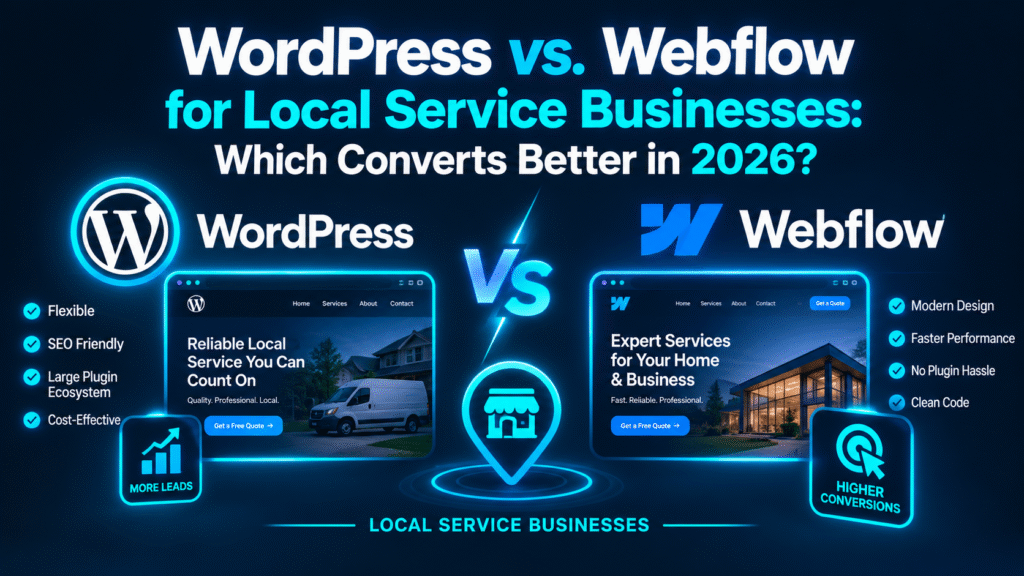
When you decide to build or redesign a website for your local service business, one platform debate will inevitably dominate your research: WordPress vs. Webflow.
If you run an auto repair or detailing shop, manage an emergency plumbing company, coordinate HVAC dispatch crews, or operate an electrical contracting service in the United States, your website platform choice is not just a technical detail. It dictates your page speed, security overhead, local search visibility, and conversion rate.
Every millisecond of loading delay, broken plugin update, or clunky mobile checkout form directly costs you high-ticket customer calls.
Historically, WordPress has powered over 40% of the entire web. It is the veteran open-source standard with an endless library of plugins and themes. On the other hand, Webflow has rapidly become the design and performance darling of modern agencies, offering clean visual development, native AWS hosting, and near-zero plugin dependency.
So, in 2026 with Google’s strict Core Web Vitals, mobile-first indexing, and the emergence of AI answer engines which CMS actually delivers higher conversion rates and better ROI for a local service business?
This guide provides an honest, data-backed comparison across design flexibility, loading speed, technical SEO capabilities, ongoing maintenance, and conversion rate optimization (CRO) to help you choose the right engine for your business.
Executive Summary: WordPress vs. Webflow at a Glance
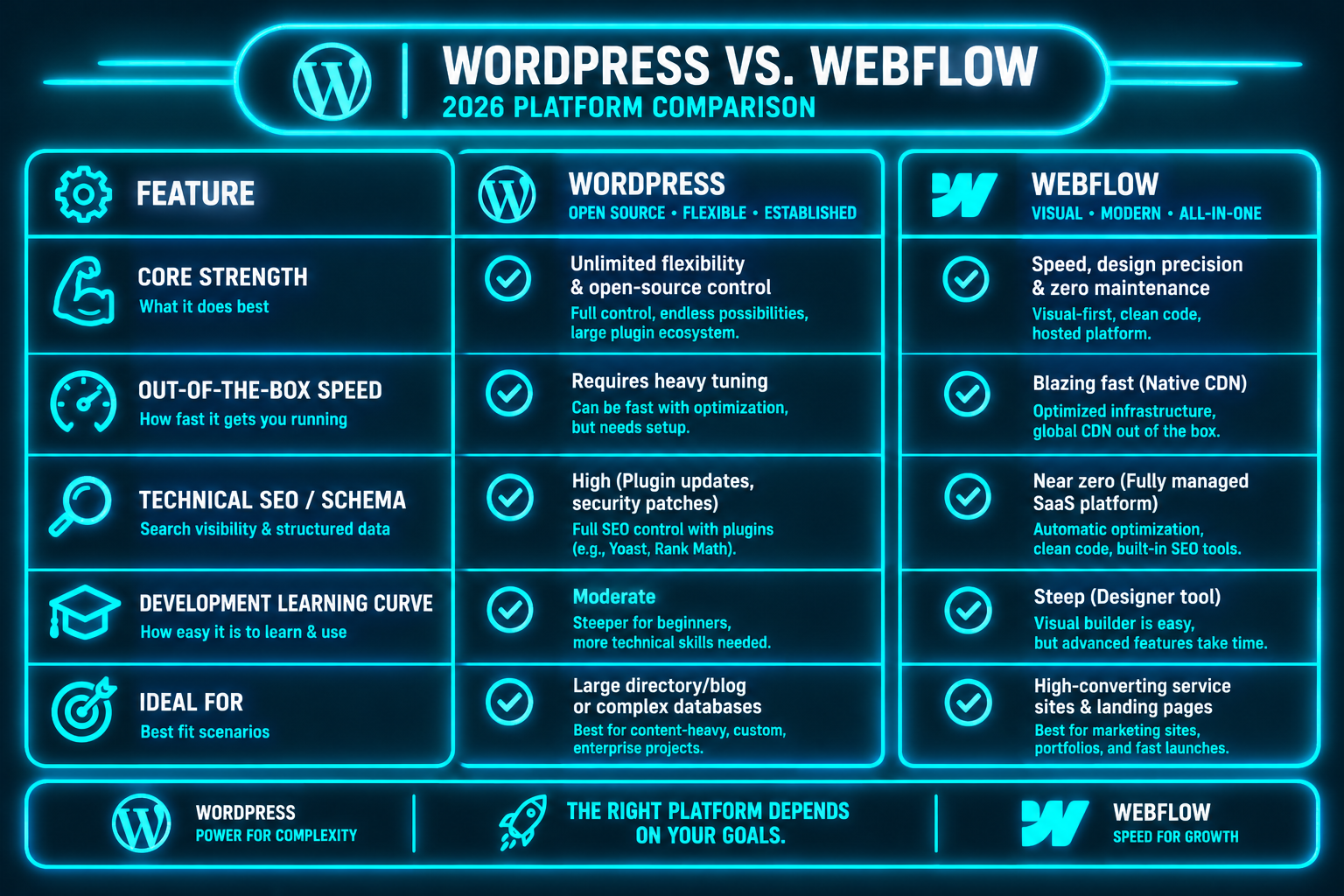
The Conversion Battle: 5 Metrics That Determine Your Leads
To determine which platform converts better, we must evaluate them through the eyes of a modern local service consumer. When an emergency or high-intent customer lands on your page, their decision to call or bounce comes down to five critical operational factors:
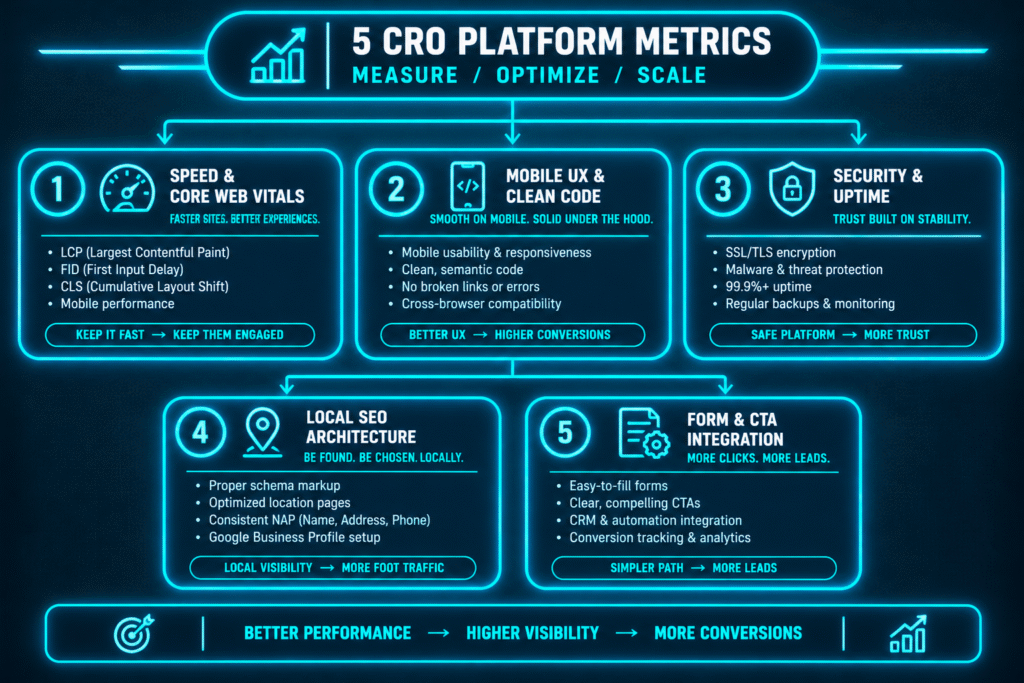
1. Page Speed & Core Web Vitals (The 2-Second Conversion Rule)
Consumer behavior data proves that conversion rates drop by an estimated 4.42% for every additional second of load time between seconds 0 and 5. For local service companies running paid ads or competing in dense map packs, speed directly dictates lead cost.
The Webflow Advantage:
Webflow outputs ultra-clean, semantic HTML5, CSS3, and modern JavaScript. Because it does not rely on dozens of separate third-party plugins injecting conflicting stylesheet assets, Webflow sites naturally score in the 90–100 range on Google PageSpeed Insights right out of the box.
Furthermore, Webflow sites are hosted natively on Amazon Web Services (AWS) and distributed globally via Cloudflare’s Tier 1 Content Delivery Network (CDN), guaranteeing consistent sub-second server response times.
The WordPress Reality:
WordPress can be exceptionally fast, but it requires serious engineering effort. A typical WordPress site using a visual page builder (like Elementor or Divi) alongside 25 different plugins for forms, caching, security, and SEO can quickly accumulate “DOM bloat” and render-blocking scripts.
To achieve green Core Web Vitals on WordPress, you must invest in premium high-performance hosting (e.g., Kinsta, WP Engine), implement advanced server-side caching (Redis/Varnish), and run asset optimization plugins (WP Rocket, Perfmatters).
- Conversion Verdict: Webflow wins natively. WordPress can match it, but only with disciplined custom development and ongoing speed management.
2. Mobile User Experience & Responsive Design Precision
Over 75% of emergency service searches (e.g., plumbing leaks, brake repairs, heating breakdowns) occur on a mobile phone. If a mobile user has to pinch-to-zoom, deals with layout shift, or struggles to tap a button, they leave.
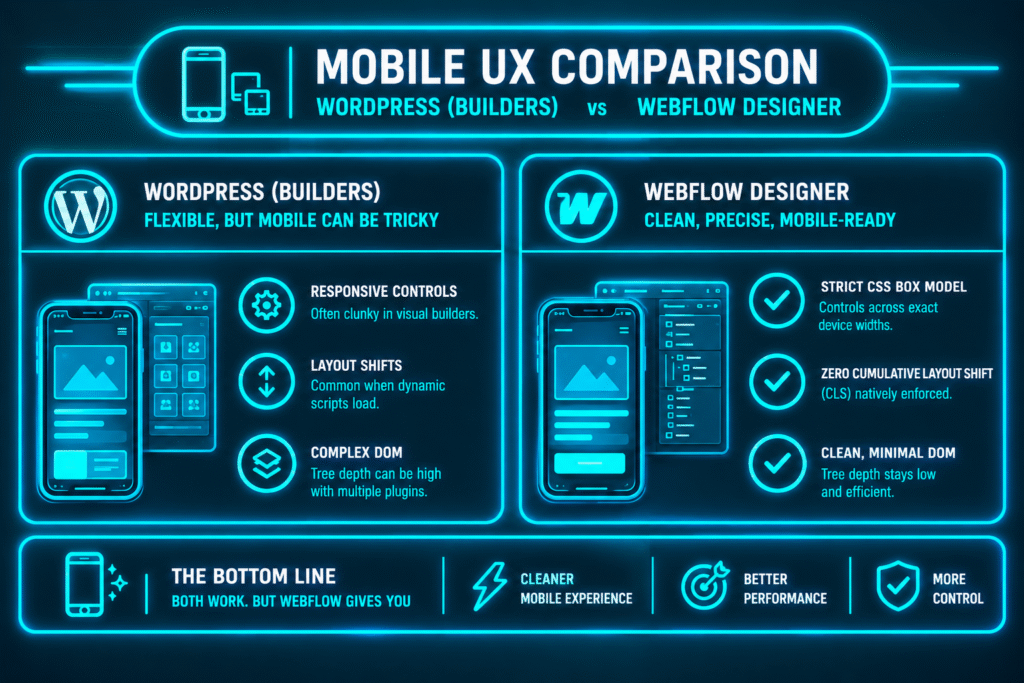
Webflow gives front-end engineers raw visual control over CSS layout models (Flexbox, CSS Grid) across multiple breakpoint widths (Desktop, Tablet, Mobile Landscape, Mobile Portrait). There is zero guesswork—what is designed in the visual editor renders with exact pixel accuracy in the browser.
In WordPress, visual page builders often produce messy nested <div> wrappers that can cause unexpected mobile bugs or layout shifts (CLS) when third-party scripts load.
- Conversion Verdict: Webflow offers superior design fidelity and cleaner responsive execution.
3. Maintenance Overhead, Plugin Bloat & Site Uptime
Nothing kills a conversion rate faster than a website that is down or displaying broken layout elements when an ad campaign is running.
The WordPress Maintenance Tax:
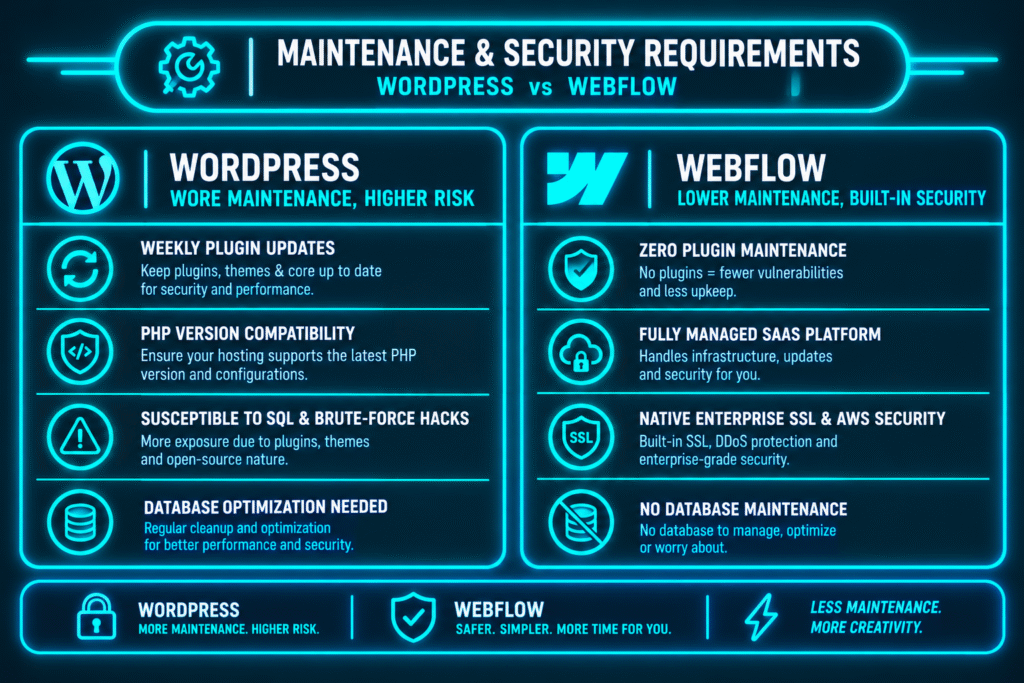
The average WordPress site uses between 15 and 35 plugins. Every week, developers release updates for themes, core files, and plugins. If an update introduces a PHP conflict between your contact form plugin and your caching tool, your booking form can silently fail for days without your knowledge.
Additionally, because WordPress is open-source, it remains the #1 target for automated brute-force attacks and malware injections, requiring dedicated security plugins (Wordfence) and routine database maintenance.
The Webflow Peace of Mind:
Webflow is a closed, fully managed SaaS ecosystem. There are no databases to maintain, no PHP versions to update, and no plugin conflicts to troubleshoot. Hosting, automated daily backups, enterprise SSL certificates, and security patches are handled automatically by Webflow’s engineering team.
- Conversion Verdict: Webflow wins hands down. For a busy small business owner, not having to worry about a broken form or hacked site translates directly into reliable lead capture.
💡 Wondering Which Platform Fits Your Growth Goals?
Don’t let the wrong technical stack throttle your local search rankings or lead volume. Let our senior developers analyze your current setup and recommend the optimal solution.
4. Technical SEO, Schema Graph & Modern AI Readiness
In 2026, a website must be easily parsed by both Google’s traditional bots and conversational AI engines (ChatGPT, Google Gemini, Perplexity).
Where WordPress Excels:
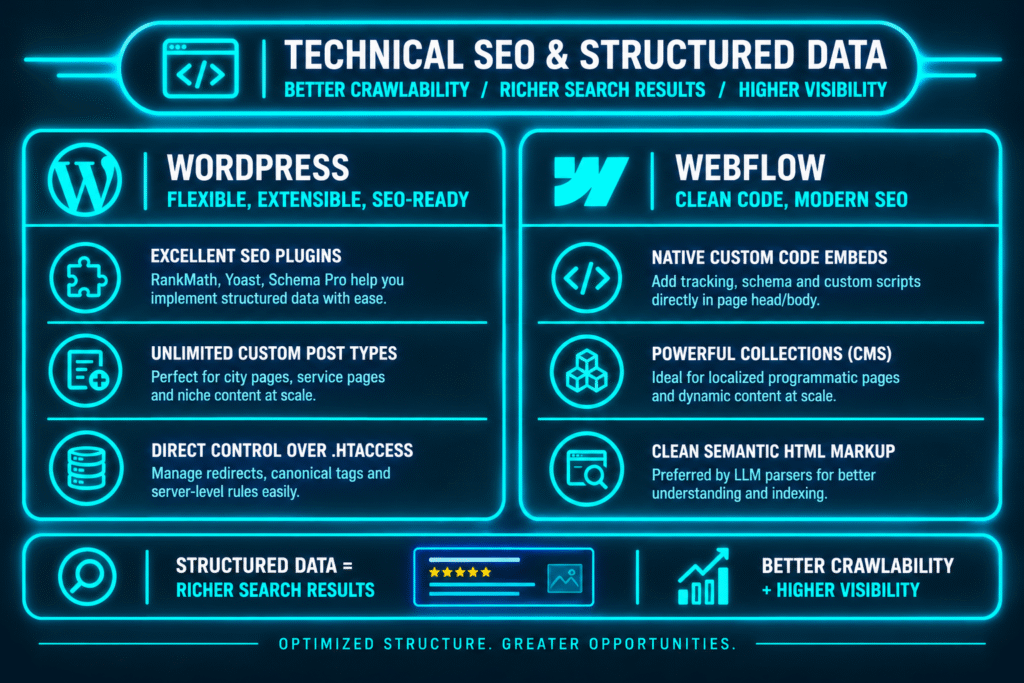
WordPress remains a powerhouse for large-scale content strategies. If your business plans to build out 200+ programmatic city landing pages across a massive multi-state territory, WordPress plugins allow for deep automation, taxonomy manipulation, and direct server-level redirection control.
Where Webflow Excels:
Webflow allows developers to inject custom, nested JSON-LD Schema markup (LocalBusiness, Service, FAQPage) directly into the page headers with dynamic CMS field bindings. The raw HTML output generated by Webflow is clean and semantic, making it effortless for AI answer engines to parse entities and cite your business in zero-click voice search results.
- Conversion Verdict: A tie. WordPress is superior for massive, thousands-of-pages directory scale; Webflow is superior for precision entity modeling and clean semantic rendering on boutique service sites.
5. Forms, Call-to-Action Tracking & CRM Automation
Capturing a lead is only half the battle; routing that lead into your dispatch software or CRM within 60 seconds is what closes the job.
- Webflow Forms: Webflow features native, lightweight form handling that integrates seamlessly with webhooks, Zapier, Make, and modern CRMs (HubSpot, Jobber, Housecall Pro). Form submissions occur without page reloads, and file uploads are handled smoothly on native AWS storage.
- WordPress Forms: Plugins like Gravity Forms and WPForms offer deep conditional logic, multi-page calculations, and direct payment gateway integrations (Stripe, PayPal, Authorize.net). However, they can add extra JavaScript weight to every page load if not properly deferred.
Real-World Case Study: Conversion Rate Before & After Migration
To see how platform choice impacts real-world performance, consider this case study of a multi-truck local service company (HVAC and emergency plumbing) operating in a competitive metro market:
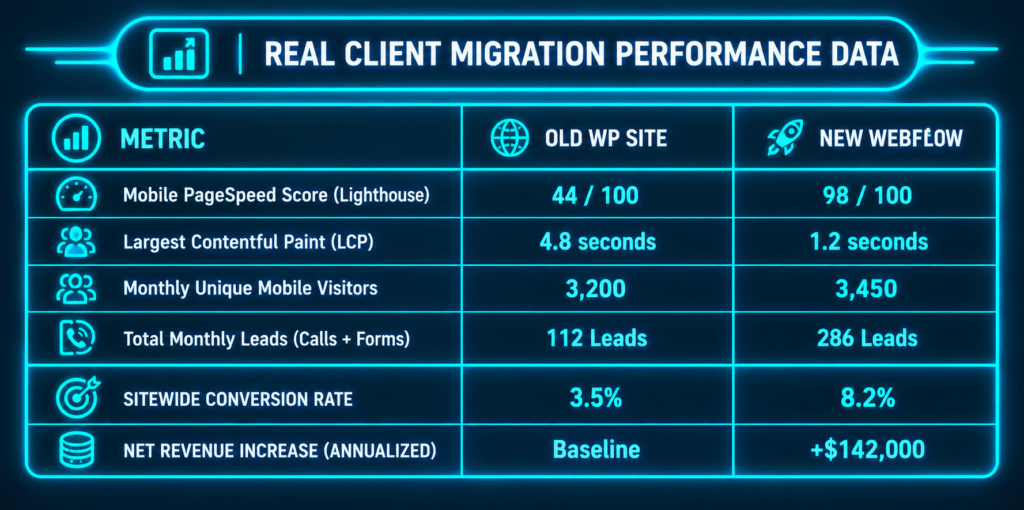
By rebuilding the slow, plugin-heavy WordPress website into a clean, custom-coded Webflow platform, the client shaved 3.6 seconds off their mobile load time. Without increasing their Google Ads budget, their conversion rate more than doubled resulting in 174 extra qualified service calls per month.
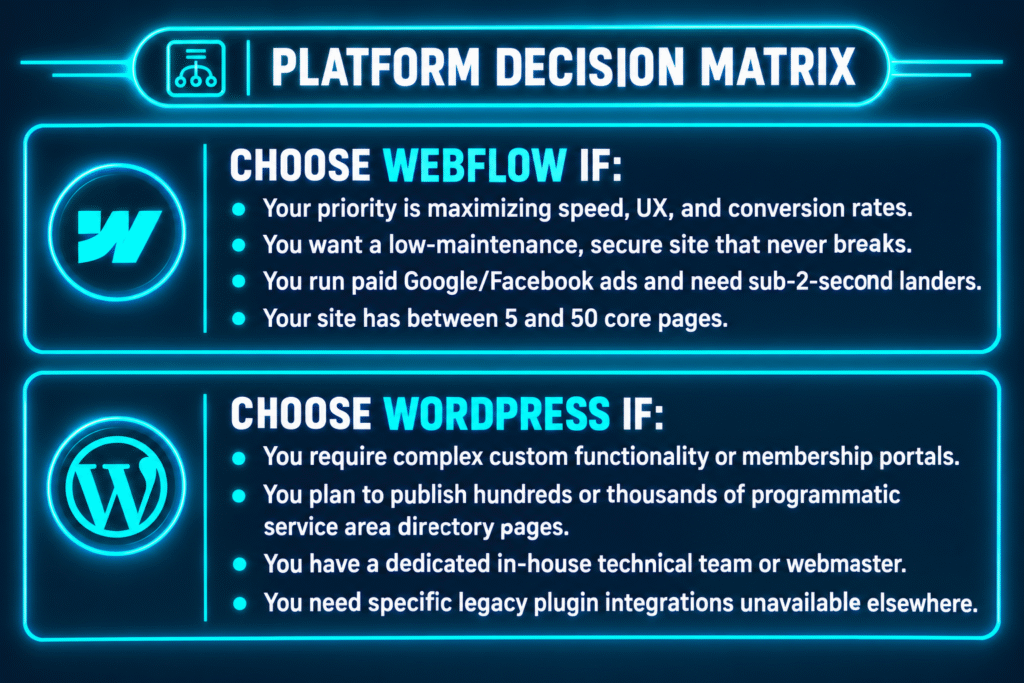
Decision Matrix: How to Choose the Right Platform in 2026
To make the right choice for your local business, match your operational requirements with the criteria below:
📊 Want a High-Converting Website Built for Your Market?
Stop losing leads to slow loading screens and broken forms. Partner with CodixMedia to design and build a modern, high-performance web platform tailored to your local service operations.
How CodixMedia Builds Custom High-Converting Websites
At CodixMedia, we don’t believe in generic off-the-shelf templates or bloated page-builder themes that slow down your business. We engineer custom, performance-driven web platforms designed specifically for USA local service providers, contractors, auto repair and detailing facilities, and emergency home services.
Our end-to-end web and digital marketing solutions include:
- Custom Web Development (Webflow & Headless WP): Fast, responsive Website Development Services built from the ground up for high conversion rates and clean code.
- Advanced Schema & Entity Optimization: Native JSON-LD Schema implementation to secure top search rankings and conversational AI citations.
- Google Business Profile Integration: Complete synergy with our Google Business Profile Management Services to maximize Map Pack conversions.
- Paid Media Acceleration: Dedicated landing pages engineered to maximize ROI from your PPC Campaign Management.
Ready to Build a Website That Actually Converts Visitors into Clients?
Stop letting technical debt, slow plugins, and poor mobile design leak revenue to your competitors. Partner with a team that measures web development success where it counts in phone calls, booked appointments, and revenue growth.
👉 Schedule Your Strategy Call with CodixMedia Today or review our design work and client results on the CodixMedia Portfolio.