If you own a local service business in the United States, your revenue relies heavily on one specific piece of digital real estate: The Google Map Pack (commonly known as the Local 3-Pack).
Whether a homeowner’s pipe bursts at 2:00 AM, an air conditioning unit stops working during a mid-summer heatwave, an auto repair shop is needed for an emergency breakdown, or a homeowner requires an electrician, modern consumers do not scroll through pages of organic listings. They pull out their smartphones, type a high-intent search query, and call one of the top three businesses featured directly underneath the map.
The Reality of Local Search: Over 70% of clicks for local service queries go directly to the businesses in the Google Map Pack. If your business sits on Page 2 or is hidden deep within the expanded local finder, you are effectively donating high-ticket jobs to your local competitors every single day.
Moving from obscurity into the coveted Top 3 Map Pack does not require a massive enterprise marketing budget. It requires a systematic, entity-focused local SEO execution strategy.
Below is the definitive breakdown of why your local business is missing from local search results and an actionable 30-day roadmap to fix it.
The Core Problem: How Google Decides Who Wins the Map Pack
Before fixing your rankings, you must understand how Google’s local search algorithm evaluates your business. Unlike traditional organic web search which relies heavily on sitewide content length and general backlinks local search algorithms operate on three fundamental pillars defined by Google:
- Relevance: How closely your Google Business Profile (GBP) and digital footprint match the specific search intent of the user.
- Distance (Proximity): How far your physical location or service area center point is from the user’s location when they make the search.
- Prominence: How well-known, trusted, and authoritative your business appears across the web (measured through citations, localized backlink profiles, review velocity, and entity associations).
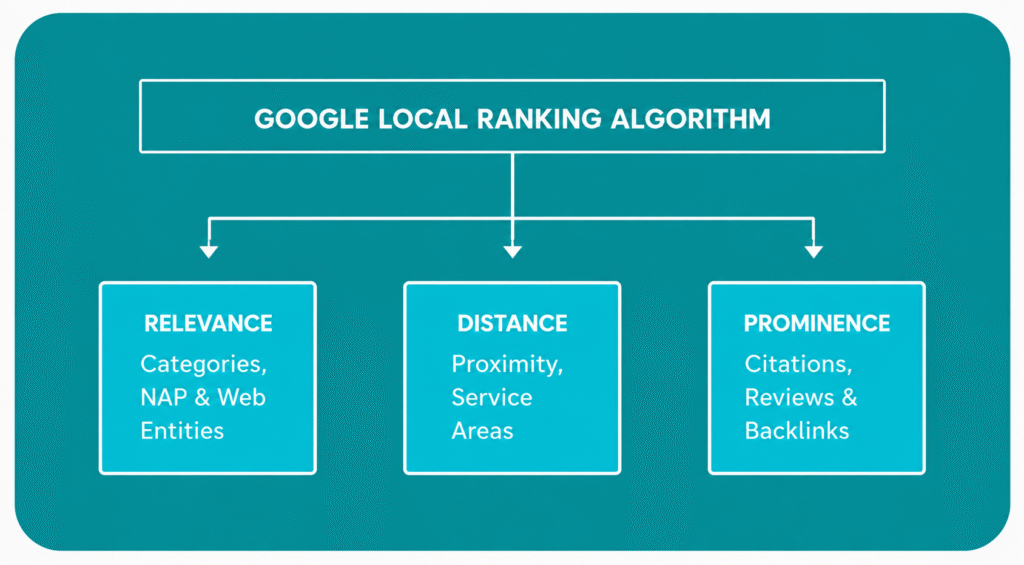
When your local service business fails to rank, it means you are sending weak signals to Google in one or more of these three core pillars.
5 Critical Reasons Your Business Isn’t Ranking in the Map Pack
1. Weak Entity Authority and Disjointed NAP Data
Google treats your business as a digital entity. An entity is a distinct, recognized real-world business entity defined by its Name, Address, and Phone Number (NAP) across the internet.
If your business name is listed as “Apex Heating & Air LLC” on Google, but appears as “Apex HVAC Repair” on Facebook, and “Apex Heating” on Yelp, Google’s Knowledge Graph becomes confused. When search engines encounter conflicting data regarding your physical address or telephone number across local directories, they lower your prominence score to protect searchers from inaccurate information.
2. Misconfigured Primary & Secondary GMB Categories
Choosing the wrong primary category is one of the most common mistakes local business owners make on their Google Business Profile.
Google weighs your Primary Category heavily when determining relevance. For instance, if an auto shop sets its primary category to “Car Wash” instead of “Auto Repair Shop”, or if a plumbing contractor chooses “Drain Cleaning Service” instead of “Plumber”, they severely limit their ability to rank for high-value core service keywords.
Secondary categories are equally critical. They tell Google’s semantic algorithms all the sub-services your business offers, ensuring you show up for niche searches like “water heater installation” or “brake replacement near me.”
3. Review Velocity and Sentiment Deficits
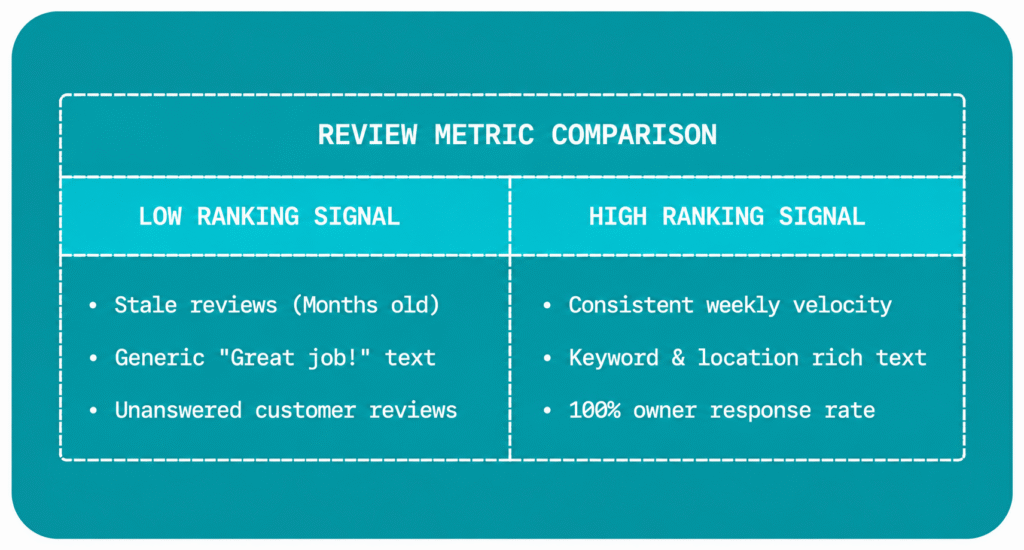
Most business owners assume having a high overall review rating (like a 4.9-star average) is enough. In reality, Google’s local algorithm measures Review Velocity (how frequently you get new reviews) and Semantic Review Content (the exact words customers use inside their reviews).
If your closest competitor gets 5 new detailed reviews every week containing keywords like “fixed my leaking pipe in Dallas” or “best ceramic coating service”, while your business receives only 1 review every two months without descriptive text, Google will rank the active, keyword-rich business higher.
4. Poor On-Page SEO and Geo-Relevance on Your Website
Your Google Business Profile and your website are directly connected. Google inspects the website landing page linked to your GBP profile to verify the services you claim to offer.
If your linked landing page lacks:
- Proper Schema Markup (
LocalBusinessstructured data) - Clear localized headers ($H1$, $H2$, $H3$ containing your city and service names)
- Fast mobile loading performance and clean user experience
- Embedded Google Maps and clear service area details
your GBP ranking will plateau, regardless of how complete your profile looks.
5. Lack of Hyper-Local Signal Generation (Geotagged Content & CTR)
Google’s algorithm monitors real-world user interaction signals: Click-Through Rate (CTR), driving direction requests, direct phone calls, and fresh visual proof of service.
An inactive GBP profile signals an inactive business. Profiles that fail to regularly upload fresh geotagged project photos, publish Google Posts, and engage with user inquiries signal low operational activity, causing search rankings to decline over time.
💡 Is Your Local Business Invisible on Google?
Stop guessing why your competitors are taking your calls. Get a Free 2-Minute Customized Video Audit of your Google Business Profile and website from our agency team.
The 30-Day Blueprint to Dominate the Google Map Pack
To help you systematically resolve these issues, we have broken down the exact execution framework used by high-ranking local service companies across the USA.
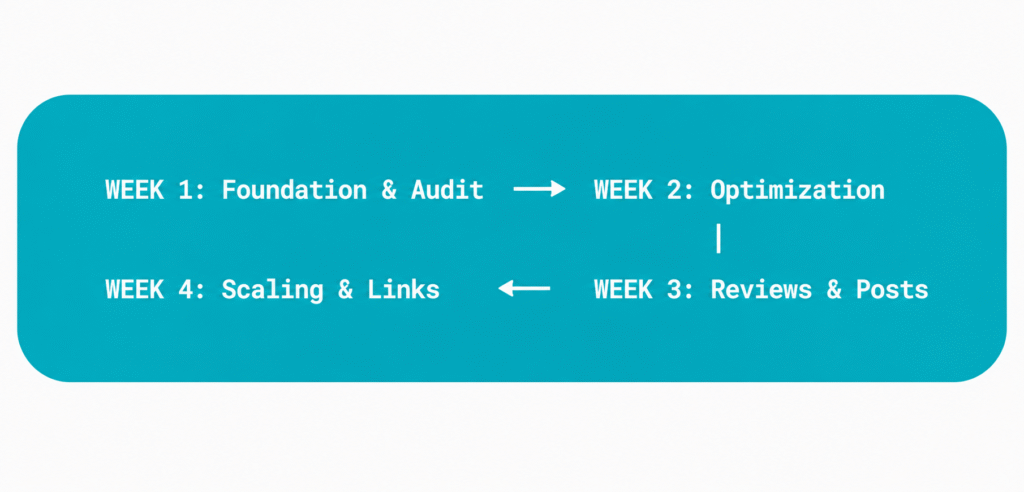
Phase 1: Days 1 – 7 | Technical Audit & Entity Alignment
The first week focuses on auditing your local footprint and ensuring your NAP data is accurate across the web.
Step 1: Clean Up NAP Consistency Across Major Data Aggregators
Audit your business listings across the big 4 data aggregators and major directories:
- Data Aggregators: Foursquare, Data Axle, Neustar Localeze
- Core Directories: Yelp, Apple Maps, Bing Places, Facebook Local, YellowPages, BBB
Ensure that your business name, street address, suite numbers, and primary local phone number match your Google Business Profile exactly.
Step 2: Audit Primary & Secondary Categories
Open your GBP dashboard and verify your category architecture.
- Set your Primary Category to the absolute core of your revenue model (e.g., Plumber, HVAC Contractor, Auto Repair Shop, Electrician).
- Add up to 9 relevant Secondary Categories covering every specific service you perform (e.g., Heating Contractor, Air Conditioning Repair Service, Water Heater Repair Service).
Step 3: Remove Duplicate & Spam Listings
Search for your business name and address on Google Maps to ensure no old or duplicate profiles exist. If duplicates are found, request to merge them through Google Business Profile Support.
Phase 2: Days 8 – 15 | Profile & On-Page Geo Optimization
Week two is dedicated to fully optimizing your Google profile and configuring your website’s local landing page.
Step 1: Maximize Profile Completeness
Fill out every single section of your Google Business Profile:
- Business Description: Write a 750-character, keyword-rich narrative explaining your services, history, and local service areas. Include core phrases like “trusted HVAC repair in [City Name]” naturally.
- Services List: Manually add every individual service item with detailed descriptions and transparent starting price points where applicable.
- Service Areas: Add the specific cities, zip codes, and counties you physically serve.
Step 2: Implement Advanced LocalBusiness Schema Markup
Add JSON-LD LocalBusiness (or specialized sub-types like HVACBusiness, PlumbingService, or AutoRepair) structured code to your website’s homepage or location page.
{
  "@context": "https://schema.org",
  "@type": "PlumbingService",
  "name": "Your Local Service Business",
  "image": "https://codixmedia.com/logo.png",
  "@id": "https://codixmedia.com/#business",
  "url": "https://codixmedia.com",
  "telephone": "+1-000-000-0000",
  "address": {
    "@type": "PostalAddress",
    "streetAddress": "123 Main Street",
    "addressLocality": "Your City",
    "addressRegion": "ST",
    "postalCode": "00000",
    "addressCountry": "US"
  },
  "geo": {
    "@type": "GeoCoordinates",
    "latitude": 00.000000,
    "longitude": -00.000000
  },
  "openingHoursSpecification": {
    "@type": "OpeningHoursSpecification",
    "dayOfWeek": [
      "Monday",
      "Tuesday",
      "Wednesday",
      "Thursday",
      "Friday"
    ],
    "opens": "08:00",
    "closes": "18:00"
  },
  "sameAs": [
    "https://www.facebook.com/yourbusiness",
    "https://www.linkedin.com/company/yourbusiness"
  ]
}
Step 3: Optimize Your Website’s Landing Page
Ensure the website URL connected to your GBP profile is fully localized:
- Place your primary keyword and target city in the Page Title, $H1$ tag, and Meta Description.
- Embed your exact Google Maps location link directly on the page.
- Ensure the page loads in under 2 seconds on mobile networks.
Pro-Tip: If your website is sluggish or struggling to convert mobile visitors, review our specialized Website Development Services designed specifically for high-converting service businesses.
Phase 3: Days 16 – 23 | Review Automation & Local Signals
Week three focuses on generating continuous user interaction signals and building social proof.
Step 1: Implement an Automated Review Request Flow
Systematize your review collection process. Every time a technician completes a job:
- Send an automated SMS and email containing a direct Google Review link within 2 hours of job completion.
- Provide a simple prompt: “Would you mind sharing a quick review mentioning what service we completed for you today?” This naturally encourages customers to include keywords like “AC repair” or “brake replacement” in their reviews.
Step 2: Respond Semantically to All Reviews
Reply to 100% of incoming reviews within 24–48 hours. Use your responses to naturally reinforce local entity signals:
“Thank you [Customer Name] for choosing us for your pipe repair in [City Name]! We are glad our emergency plumbing team could help get your water back on quickly.”
Step 3: Publish High-Frequency Visual Proof (Google Posts & Photos)
- Upload 3 to 5 real, non-stock photos weekly showing your technicians on job sites, labeled work vans, and completed projects.
- Publish 2 Google Posts per week sharing seasonal maintenance tips, special discounts, or recent job highlights with direct call buttons (e.g., “Call Now” or “Book Online”).
Phase 4: Days 24 – 30 | Hyper-Local Link Building & Authority Scaling
The final week builds the online prominence required to pass established competitors.
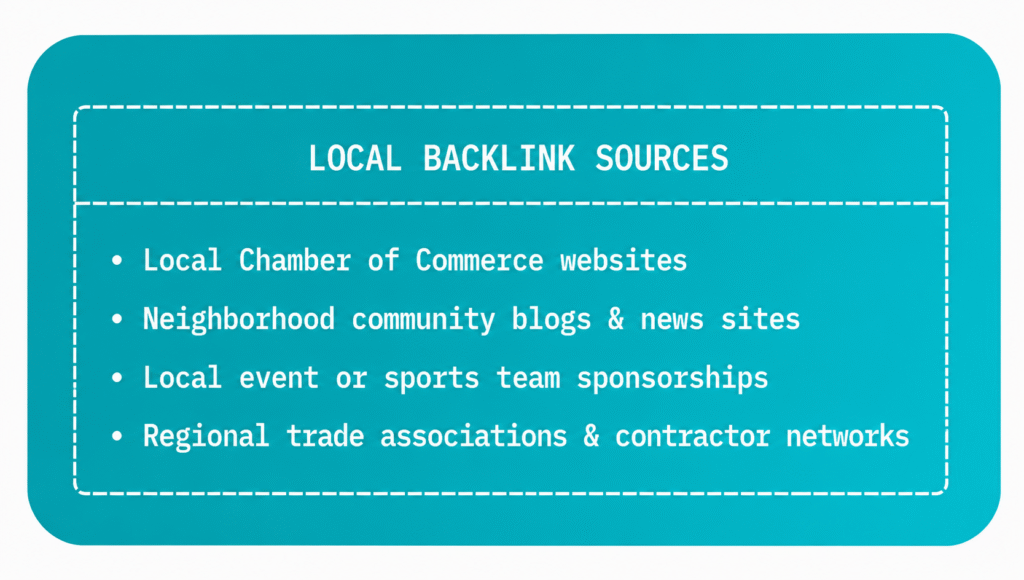
Step 1: Acquire Localized Authority Backlinks
Generic backlinking strategies do not work effectively for local search. You need links from sources that Google associates with your physical city or niche:
- Sponsor local youth sports teams, community events, or non-profit charities.
- Join your city’s Chamber of Commerce and local business networking associations (BNI chapters).
- Get featured in local news publications, city blogs, or regional trade associations.
Step 2: Track Geo-Grid Keyword Rankings
Traditional rank trackers give you a single blanket ranking score for a whole city. However, rankings vary from block to block based on proximity.
Use a Geo-Grid Rank Tracking Tool to view your Map Pack visibility across a multi-mile grid surrounding your business address. Identify areas where your signals drop off (e.g., turning from Green #1-3 to Yellow/Red #4+) and focus your hyper-local content efforts on those specific neighborhoods.
Measuring Success: Key Metrics to Track in GBP Insights
Do not rely solely on keyword ranking positions to judge performance. Monitor these action metrics inside your Google Business Profile performance dashboard:
- Direct Phone Calls: The total number of customers who clicked the “Call” button directly from the Map Pack listing.
- Direction Requests: The number of users who requested driving directions to your shop or physical address.
- Website Clicks: The volume of high-intent traffic navigating from the local finder to your booking page.
- Discovery Searches: Searches where users found your business while looking for a general category or service rather than your specific brand name.
Final Thoughts: Consistent Local SEO Wins the Market
Ranking in the Google Map Pack is not a one-time effort. It is an ongoing business practice. Algorithms change, new competitors enter the market, and established shops continuously update their digital profiles.
By aligning your NAP consistency, choosing accurate categories, building steady review velocity, and powering your web pages with optimized technical SEO, your business can claim its rightful place in the Top 3 Map Pack.
Ready to Scale Your Local Service Business?
If managing technicians, handling customer calls, and running day-to-day operations leaves you with no time to execute local SEO, let our team handle the technical heavy lifting for you.
At CodixMedia, we specialize in helping local service businesses dominate Google search, eliminate empty appointment slots, and scale predictable revenue.
👉 Schedule a Strategy Call with Our Local SEO Specialists Today or explore our dedicated Google My Business Optimization Services to get started!